

False Dream
Patch notes · News · Live player count
About
You find yourself trapped in a dream. If you capture anomalies in the dream with a camera, you might be able to escape.
Media Gallery(12)
Detailed
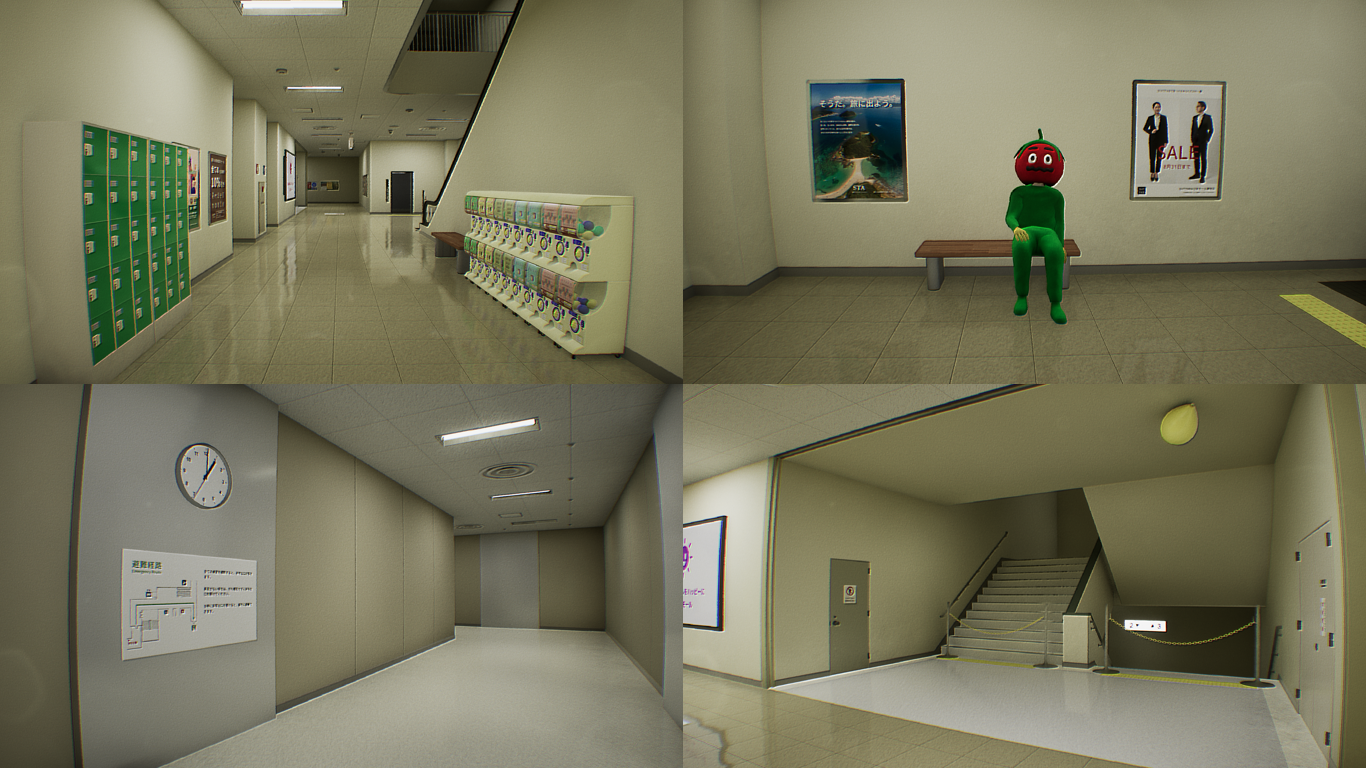
You find yourself trapped in a dream. Capture anomalies, meaning locations or phenomena that deviate from reality, with a camera. By doing so, you might be able to return to reality.How do I play?Please take a look at the image below. Can you spot any unusual elements? It's a game where you find them and capture a photo with a camera.Two ModesThere are two modes: Normal Mode and Nightmare Mode.In Normal Mode, an anomaly will always occur at each time.However, in Nightmare Mode, there are instances where no anomaly occurs. Is it that there are no anomaly, or is it simply that you haven't been discovered yet?I recommend starting with the normal mode.Playtime and content sizeThe expected playtime to clear the normal mode once is approximately 20 minutes to 1 hour and a half. It would take more than three hours to capture all anomalies. There will be a total of 81 anomalies occurring.Save DataEven if you stop the game midway, the anomalies you've captured are saved. However, please be aware that anomalies discovered using the radio (helping item) are not saved, so please be cautious.If the Game CrashesThere are reports that updating the graphics card driver to the latest version resolves crashes.Additionally, it may not work without a driver that supports DirectX12.insufficient graphics card memory could also be considered as one of the causes. Please try reducing the graphics quality from the settings menu.If it still does not work, please proceed with a refund.Gameplay Videos and StreamingFeel free to publish gameplay videos or stream the game without contacting the developer.For Those Prone to Motion Sickness in 3DAdjust the following settings in the configuration menu:- Set the "Head Bob" slider to 0.- Set the "Motion Blur" slider to 0.Recommended Graphics SettingsSetting the Global Illumination to "High" or higher enhances the game's atmosphere thanks to UE5's Lumen feature. However, be aware that this can significantly strain your GPU, potentially resulting in slower performance.If your FPS (Frames per Second) is low, consider lowering the graphics settings. After starting the game, pause it to see the FPS displayed in the top left corner. The FPS is adjusted in-game to range from 22 to 62.
Patch Notes & Announcements(18)
 MINOR
MINORThe spiritual successor to False Dream has been released.
I have released "False Mall," the spiritual successor to "False Dream," today! https://store.steampowered.com/app/3095550/ {STEAM_CLAN_IMAGE}/44815797/b6dcb5570759a467261c560b3c22eef38b8164cb.png The
 MINOR
MINORNintendo Switch was released! (US and Japan)
Yesterday, the Nintendo Switch version was released! (Please note that it's available only in Japan and the United States. I apologize to those in other regions.) https://www.nintendo.com/us/store/pro
MINORFinal adjustments (v1.10.1)
I have made final adjustments: - Fine-tuned the collision size of interactive objects. - Adjusted the collision size of the target for capturing. - Improved the visibility of the clock face for better
MINORUpdate v1.10.0
- Added a feature to reset the save data. - Title menu -> Settings -> General tab -> Reset Save Data - Bug fixes: - Fixed a bug where, after completing all anomalies, enabling the "Disable captured (o
MINORMinor Changes (v1.9.1)
- Review of light settings (smooth shadows). - Settings UI: - Fixed a bug where toggle button settings were automatically reset to default values. - Changed the position of the "Back" button. - When t
MINORGamepad Support (v1.9.0)
I have updated to v1.9.0. With this update, I have added support for UI navigation using a gamepad, allowing players to control the entire game using only the gamepad. Changes - Changed the aiming cam
MINORMinor Changes (v1.8.4)
- Add an explanation to the "Resume" option in the title menu. - Correct the translation error (replace "Revert" with "Resume").
MINORMinor Changes (v1.8.3)
- Correct the orientation of the hangers. - Fine-tune the size of the bathtub. - Revise the images for the operation instructions. - Clarify that "Interact" and "Capture with camera" are separate acti
MINORMinor Changes (v1.8.2)
- Added a motion blur intensity setting to the configuration screen. Setting the intensity to 0 may alleviate 3D motion sickness. - Fixed a bug where the picture disappears when the player comes into
MINORMinor Updates (v1.8.1)
- Fixed the light switch. Adjusted the size of the collision for interaction. - Fixed the clocks in the prologue and epilogue. Resolved the bug causing a mismatch between the digital and analog clocks
You Might Also Like
Popular titles trending on Steam right now.





