

S.U.P.E.R Editor BETA version now live
The Last Leviathan Patch Notes — September 8, 2017
Aggregated from Steam, cross-tracked with Battle.net coverage on GamePatchNote.
Hello you lavish librarians of leviathan etiquette
FINALLY!!!
There is a new version of The Last Leviathan now available in BETA. This is version v0.3.1 (Build 311)
To Opt In to beta PLEASE READ the notes at the bottom of this announcement
BETA ONLY UPDATE
This has been pushed to a separate branch where you have to manually opt-in to download it. (instructions below) ONLY opt-in if you don’t mind playing a bugged version. We’ve checked it all ourselves but there WILL be bugs, we’re doing this so that we can find them and squish them before rolling it out into the main branch for all players.
We NEED bugs and feedback please, if you spot something, write it down and add it to the bugs forum on steam – MAKE SURE YOU SAY BETA VERSION in the heading so people know it’s not the live version. Bugs are placed here
Well that took some time didn’t it? We are sorry for the delays to this release, it’s been bloody hard work for us, we wanted to release it earlier but it just wasn’t ready. We’ve also limited this BETA to the core fundamentals and have NOT included monsters or the level editor. They’re still not ready, but they are coming along nicely and will be released soon (ish).
As we can’t list everything we’ve done here (its a lot!), We’ll put the bullet points:
First thing: This release is the first in a series of brand new content releases showcasing the work we've been doing over the past 10 months. We’re completely rewritten the editor so its massively more powerful and this update focuses on the new S.U.P.E.R. Editor functions with the addition of some brand-new power-blocks:
New Blocks:
We’ve added the following to this version:
- The Piston
- Butt Hinge
- Powered Hinge
- Powered Ball Joint
- The Controller
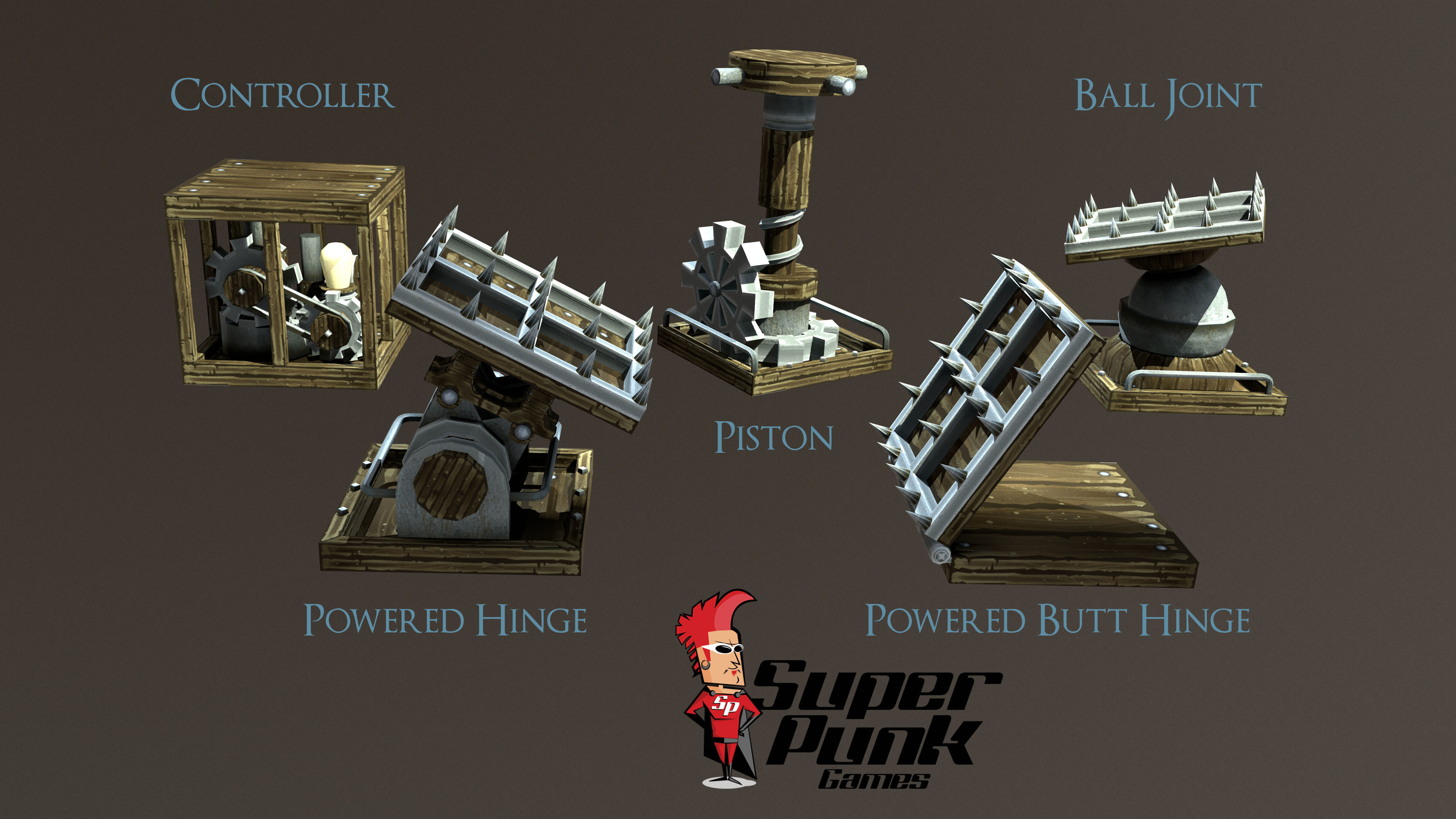
We’ve built more blocks but want to focus on these in BETA for the time being (along with the editor) as they are add a lot of core functionality that needs testing properly before more blocks are introduced
The Controller is a very special block that gives you the power to sequence block functionality over time. This is an R&D block and we're looking forward to seeing what you guys do with it.
There will be a tutorial video coming soon for this very special block, but let’s see if you guys can figure it out on your own first…
The Editor Re-write:
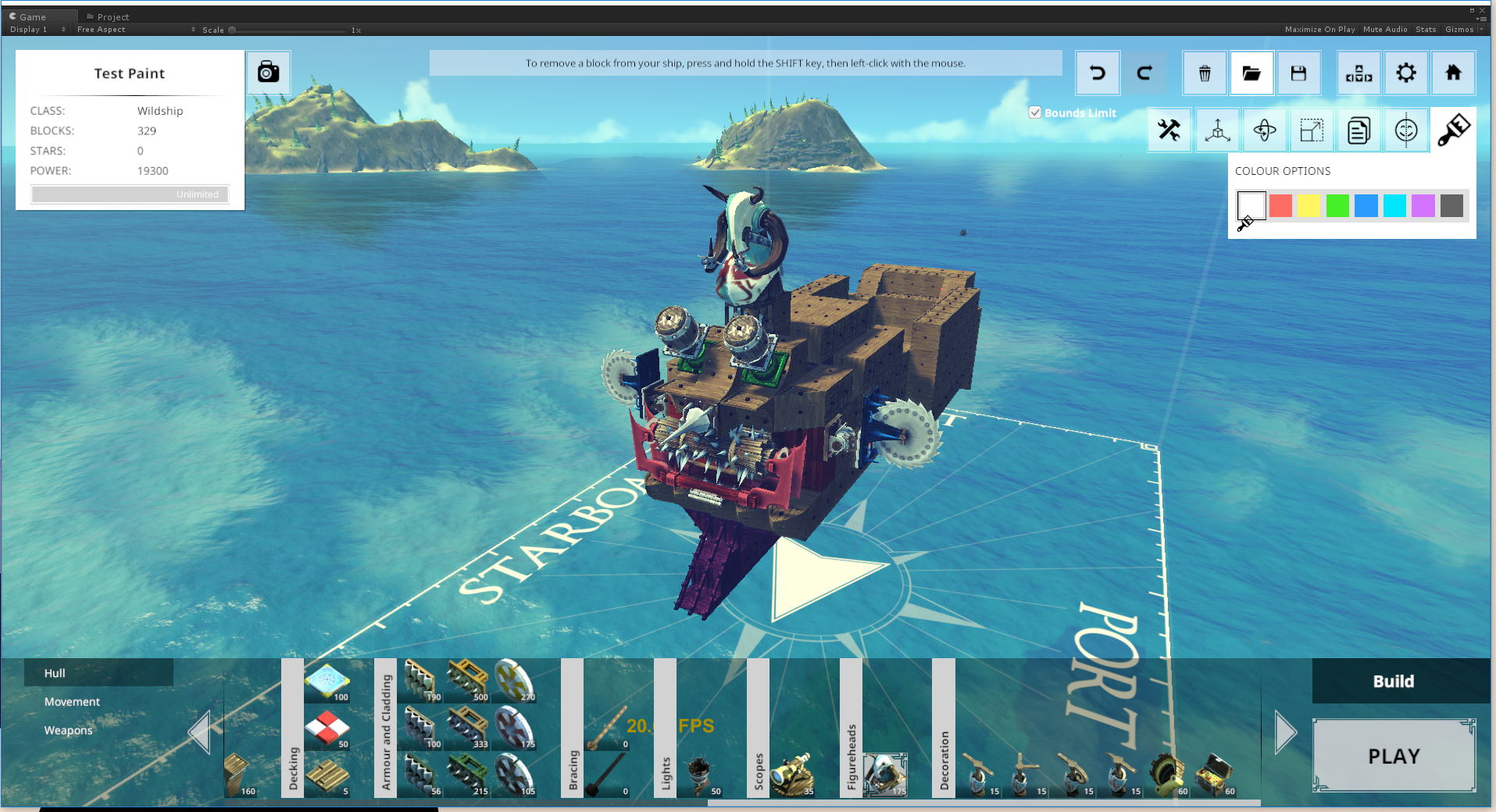
The Ship Editor has been re-written from the ground up to make it hugely more powerful and in preparation for Monsters. What it also gives us is more freedom to create, removing the grid-like limitation you had before and opening up possibilities for greater building tools. The new editor has been dubbed the SUPER Editor and contains the tools:
- Build Mode (Default)
- Translate: Tutorial Video here: https://youtu.be/WAvcYWAkBaY
- Rotate: Tutorial Video here: https://youtu.be/541lyJZte9Q
- Scale: select individual or multiple blocks and scale in various axis
- Copy: copy a block and its properties
- Paint: choose one of 8 colours for blocks individual or as a group
We’ll be doing more tutorial videos very soon.
Other Features of note:
- Bounds Limit: there is now an option to turn the bound limit off for your creations, this means you can build ‘outside the box’ and not just think outside the box (see what we did there?). Three words: EPIC Massive SHIPS!!
- Point at a block and press F to focus the camera on a particular block in the editor.
- Block Properties panel is now scrollable and exposes more block properties than before. Block properties are also copied when you copy a block.
- Billions of optimisations.
- Save data – Even though we’ve changed the game on a fundamental basis all your current save data should be fine, as should your ships. If you notice anything not right about this, please add it to the bug list. We need to know that stuff!
As always, if you want to build HUGE ships or are still experiencing low framerates, please adjust your graphical settings at start up to 'Fastest' and untick/lower the various graphical settings in the options menu.
There are no monsters or multiplayer yet. Both these items are HUGE investments in time for such a small team. We have started monsters but they will take some time to get right and we will only release when they are, they HAVE to be frickin awesome don’t they,
Beta opt-in instructions
Here's what you need to do:
- Shut down Steam (IMPORTANT!)
- Re-start Steam.
- Go to your Steam Library.
- Right-click on The Last Leviathan game in your Steam Library and select the Properties option.
- Click on the Betas tab
- In the "Enter beta access code..." field, type in the Public Beta password:
PenguinTorpedo
- Click on the Check Code button. Steam should then tell you that you have unlocked the public_beta branch.
- In the "Select the beta..." drop down, select the public_beta branch.
- Click the Close button.
Steam will then begin downloading the app in the background. Once it's finished, you should be good to go.
Important Notes
- Steam Workshop. PLEASE DO NOT UPLOAD anything to Steam workshop - any new blocks you upload will NOT be available for existing users and will, most likely, crash their game.
- Sometimes downloads are not automatic and you may need to select the “verify integrity of game cache” option from the ‘local files’ tab in the properties menu.
Thanks for joining us on the journey that is Early Access, we will get there with your help!
SPG
ːlastleviathanː