

Display Selector is ready!
Planet Evolution PC Live Wallpaper Patch Notes — July 18, 2019
Aggregated from Steam, cross-tracked with Battle.net coverage on GamePatchNote.

Many users with many screens asked for features to select only one screen to display our project. It was our priority to add such a possibility.
It works after a big fight with the Windows code!
When you start the wallpaper for the first time, a window is displayed where you can select the detected screen. The same function is available in the menu if someone wants to change the screen.
Run the first menu: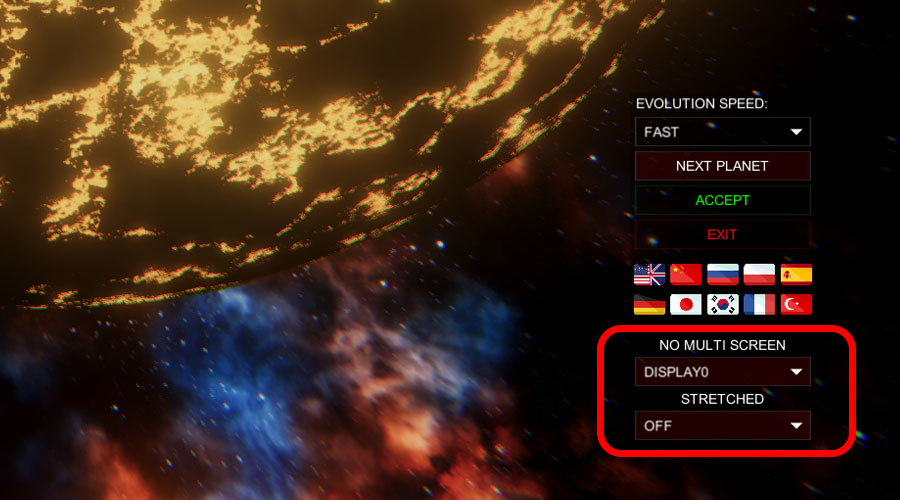
In the menu: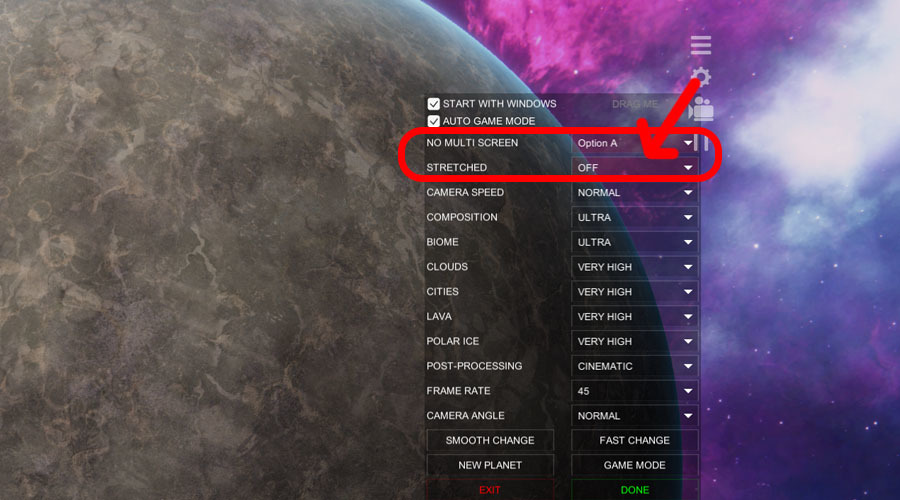
Attention
Unfortunately, after this update, you will probably lose your background settings. We are sorry :( :( :(
If you do not see any new features (probably the automatic update is disabled), you should uninstall the wallpaper and reinstall it.
It's not all.
We have added the "Auto Game Mode" which automatically pauses the wallpaper when you turn on the normal game full screen. It automatically gives you 100% of your PC's performance for your favourite games.
The wallpaper recognizes another application / the game is in full-screen mode and then turns off. When you turn off the game, the wallpaper automatically appears on your screens.
Attention
Some games do not turn on "real" full-screen mode, so our wallpaper does not turn off. Before you turn on such a game, you need to press the "GAMEMODE" button on the background image itself to get 100% power.
Thank you for your support. Thanks to you, we are constantly developing our projects.
3DM